
Ultimate Smart‑Tech Stack to Convert Your Home Office into a Fitness & Wellness Studio: Wearables, Circadian Lighting, Air & Acoustic Upgrades
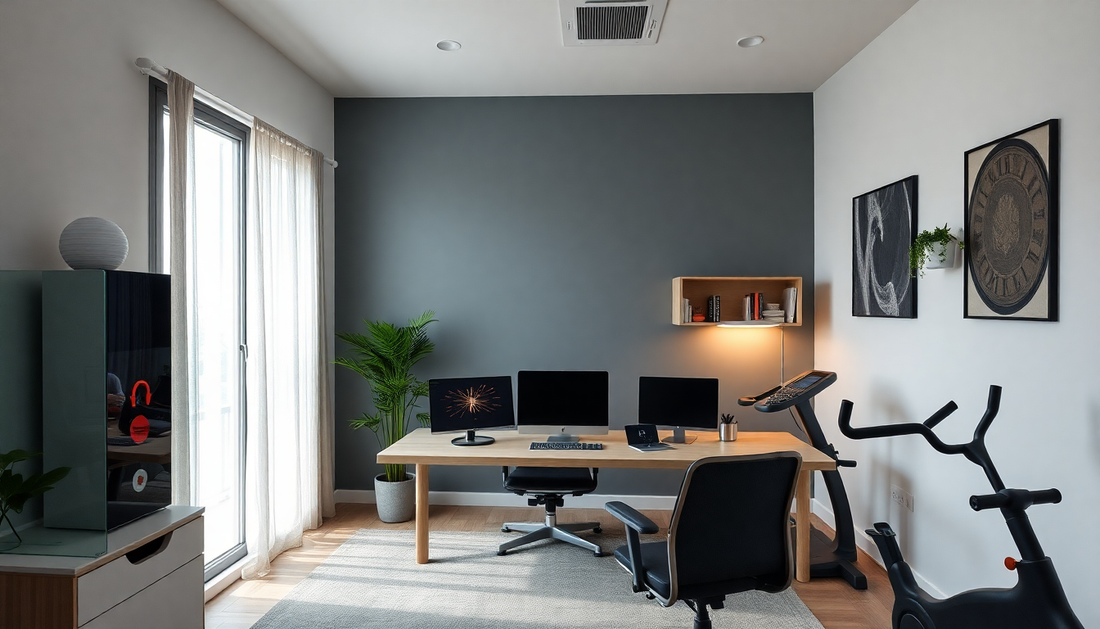
Introduction — The New Hybrid Home Studio
The line between work and wellbeing no longer needs to be a compromise. With a thoughtful smart‑tech stack, your home office can double as a high‑functioning fitness and wellness studio that supports performance, recovery, concentration, and long‑term health. This extended guide covers everything you need to plan, buy, install, and automate a reliable, privacy‑minded hybrid space. Expect practical device recommendations, evidence‑based ranges for lighting and air quality, step‑by‑step setup workflows, and templates for automations that respond to wearable data.
Why Convert a Home Office into a Fitness & Wellness Studio
- Time efficiency: reduce friction between work and exercise by keeping equipment accessible.
- Productivity boost: better air, light, and movement raise cognitive performance.
- Sleep and recovery: circadian lighting and ventilation support sleep quality and recovery metrics.
- Long‑term health: continuous tracking and environment control decrease chronic risks and improve wellbeing.
How to Use This Guide
Read end to end for a full build, or jump to sections for wearables, lighting, air, acoustics, equipment layout, networking and automation, privacy, budgets, and a 90‑day optimization plan. Each section includes actionable recommendations and practical numbers you can use during design and purchase.
Core Design Principles
- Measure first: floor plan, ceiling height, sun orientation, and electrical access are foundational.
- Prioritize simplicity: automation should reduce steps, not add complexity.
- Start local: use local control and edge processing where possible for speed and privacy.
- Iterate with data: use wearable and environmental sensors to tune light, air, and activity schedules.
- Design for multiple modes: work, active movement, recovery, video calls, and sleep/naps.
Wearables and Personal Tracking — The Control Layer
Wearables are the feedback loop that make your environment adaptive and personalized. They provide HR, HRV, sleep, activity, and stress proxies so automations can act at the right time.
Key Wearable Types and Strengths
- Smartwatches: continuous optical HR, notifications, apps, GPS for outdoor workouts, and often ECG features for atrial fibrillation detection. Good for mixed use and real‑time feedback.
- Rings and adhesive sensors: very low profile, excellent sleep and HRV tracking with long battery life. Ideal for minimal disruption and overnight data collection.
- Chest straps and patches: gold standard for workout HR accuracy, especially during high intensity and when optical sensors struggle.
- Smart clothing and IMU sensors: posture feedback, rep counting, and biomechanical analysis for strength and mobility training.
Important Metrics and Practical Targets
- Resting heart rate: lower values generally indicate better cardiorespiratory fitness. Track trends, not daily spikes.
- Heart rate variability HRV: useful as a recovery readiness indicator. No universal threshold; compare to personal baseline and watch for sustained drops over 3-7 days.
- Sleep duration and efficiency: aim for consistent total sleep time and 85 percent sleep efficiency as starting targets.
- Activity rings and step goals: use movement nudges to avoid prolonged sitting. Micro‑breaks every 30 to 60 minutes recommended.
How to Use Wearable Data to Drive Automations
- Readiness checks: if HRV and sleep meet readiness thresholds, trigger an interval workout profile with daylight simulation and music boost.
- Recovery mode: when wearable indicates high stress or poor sleep, automatically set a low‑stimulus environment — warm lighting, quiet soundscape, reduced notifications.
- Activity prompts: if step counts are low by midday, trigger a 10‑minute mobility routine with directional audio and an open window for ventilation.
Data Hygiene and Privacy
Keep wearable data secure by enabling two‑factor authentication, limiting third‑party app access, and choosing local sync when available. Consider a local health dashboard like Home Assistant or a self‑hosted analytics stack for more control.
Circadian Lighting — Aligning Light with Biology
Light drives the circadian system. A good circadian lighting system manages intensity, spectrum, timing, and direction to support alertness during the day and melatonin release at night.
Core Concepts and Numbers
- Correlated color temperature CCT: use cool blue‑enriched light 5000K to 6500K during active daytime, and warm light 2000K to 3000K for evening wind‑down.
- Illuminance lux: aim for 300 to 1000 lux at eye level during work and 50 to 150 lux for afternoon naps and pre‑sleep wind down.
- Melanopic lux and melanopic ratio: prioritize devices that publish melanopic values. Higher melanopic lux increases alerting effects; lower reduces circadian disruption.
- Timing: begin wake simulation 30 to 60 minutes before desired wake time and reduce blue content 90 to 120 minutes before sleep.
Devices and Layout Strategies
- Overhead tunable LEDs: indirect, diffused fixtures reduce glare and provide even base lighting. Place to avoid screen reflections.
- Bias lighting for monitors: warm bias lighting reduces eye strain and improves perceived contrast.
- Task lighting: adjustable color temperature desk lamps for close work and reading.
- Accent lighting: wall washers or panels for low‑angle warm light during evening recovery sessions.
Advanced Lighting Automations
- Tie lighting scenes to calendar events: bright, cool light for scheduled focus blocks; warm low light for scheduled breaks or meditation.
- Use sunrise/sunset schedules adjusted by wearable sleep data rather than fixed clock times.
- Implement transient lighting changes during workouts to signal intervals or cooldowns using quick color flashes or intensity pulses at safe, non‑strobing rates.
Air Quality and Ventilation — The Foundation of Cognitive Health
Indoor air quality impacts attention, decision making, and overall health. Improving filtration, ventilation, and humidity is essential in a hybrid office/studio.
Key Indoor Air Quality Metrics and Targets
- CO2: keep below 800 ppm for good cognitive performance; avoid sustained periods above 1000 ppm.
- PM2.5: aim for an average below 12 micrograms per cubic meter; sensitive users should target below 8.
- VOC: minimize volatile organic compounds by using low‑VOC materials and activated carbon filtration; track if possible with an IAQ monitor.
- Relative humidity: maintain 40 to 60 percent to reduce respiratory irritation and maintain comfort.
Recommended Devices and Upgrades
- HEPA filtration: choose a purifier rated for the room volume with a Clean Air Delivery Rate CADR that matches your square footage and activity level.
- Activated carbon: include a carbon stage to remove odors and VOCs from paints, furniture, and cleaning products.
- CO2 sensor: install a real‑time CO2 monitor near the breathing zone, not near windows or vents, to measure occupancy effects.
- ERV/HRV ventilation: consider heat or energy recovery ventilation for whole‑home or whole‑room solutions to bring in fresh air efficiently.
- Humidity control: use a humidifier in dry climates and a dehumidifier in humid climates to stay in the 40 to 60 percent band.
Automation and Best Practices
- Demand control ventilation: trigger fans or open motorized windows when CO2 exceeds threshold or PM spikes during high‑intensity workouts.
- Schedule filter usage: run purifiers at higher speeds during workouts and lower during rest periods to save energy and reduce noise.
- Positioning: place filtration units near the emitter of aerosols such as workout zones or desks, not tucked in corners.
- Maintenance: set calendar reminders for filter replacement and descaling humidifiers.
Acoustics and Sound Management — From Focus to Recovery
Sound affects both concentration and relaxation. Good acoustic design reduces fatigue, improves call quality, and supports immersive recovery practices like guided meditation and binaural soundscapes.
Acoustic Goals and Recommended Ranges
- Background noise for focused work: aim for 35 to 45 dBA; lower is better but not always practical.
- Speech intelligibility: control early reflections and reverberation so voices sound clear on calls. Use absorbent materials at first reflection points.
- Impact noise: for floors and exercise, use underlay, rugs, or vibration isolation pads for equipment to reduce transmitted noise.
Practical Acoustic Treatments
- Absorptive panels: place on walls and ceilings where reflections form between speaker and microphone.
- Diffusers: use in larger rooms to break up standing waves without deadening the space entirely.
- Mobile acoustic screens: useful for creating temporary exercise zones or dampening equipment noise during intense sessions.
- Soft surfaces: rugs, upholstered furniture, and thick curtains add necessary absorption and comfort.
Audio Systems and Profiles
- Multiroom speakers: create profiles for training, recovery, and conference calls so switching modes is immediate.
- Directional audio: use beamforming or directional speakers if you need to avoid disturbing others in the home.
- Headphones and earbuds: noise‑cancelling headphones are invaluable for focus and for immersive guided sessions. Offer a workout profile for low‑latency, high‑motion use.
Equipment, Layout, and Multi‑Function Furniture
Maximize utility per square foot with compact, foldable, and integrated equipment that stays out of sight when not in use.
Space Planning by Room Size
- Small studio 8 to 12 m2: prioritize foldable equipment like a wall mirror that folds, compact adjustable bench, resistance bands, and under‑desk bike or treadmill for micro‑movement.
- Medium room 12 to 20 m2: include a full smart mirror, compact weight set, foldable rack, and a mid‑size air purifier. Create separate zones with rugs and screens.
- Large room 20+ m2: you can have dedicated cardio, strength, and recovery corners, larger acoustic panels, and integrated ERV ventilation.
Furniture and Equipment Recommendations
- Height adjustable desk with cable management and programmable positions for standing/sitting presets.
- Treadmill desk or under‑desk elliptical for movement while working.
- Smart mirror or interactive screen for guided classes and form feedback; prioritize models with local processing when privacy is a concern.
- Compact strength system: adjustable dumbbells, resistance bands, and a convertible rack or wall‑mounted system.
- Recovery station: foam roller, massage gun, travel‑sized percussion tools, yoga mat, and a comfortable reclining chair for cooldowns and naps.
Connectivity, Power, and Network Topology
Reliable networking and power are non‑negotiable to keep automations responsive and streaming stable.
Networking Best Practices
- Wired backhaul: use Ethernet to anchor key devices like media hubs, smart mirrors, and main mesh nodes for stability.
- Mesh Wi‑Fi: position nodes to minimize packet loss and ensure consistent throughput for wearables, speakers, and cameras.
- VLAN segmentation: separate IoT devices from work devices and sensitive endpoints to reduce attack surface.
- Quality of Service QoS: prioritize video calls and control traffic for audio/automation latency sensitivity.
Power and Reliability
- UPS for network hardware: protect routers, switches, and smart hubs so automations continue through brief outages.
- Surge protection and proper grounding for sensitive electronics and power‑hungry equipment.
- Smart outlets and power strips: monitor power draw and provide remote on/off control for devices and charging zones.
Automation Platforms and Examples
Choose an automation platform that balances local control and cloud convenience. Home Assistant is a strong local option; HomeKit integrates tightly with Apple ecosystems; Google and Alexa offer broad device compatibility. Use the platform you trust and can maintain.
Sample Automations
- Readiness‑based training trigger: if wearable readiness score is good and no meetings on calendar, set scene to training: cool high lux lighting, turn on purifier to high, play interval playlist, and unlock workout screen.
- Meeting focus mode: when a meeting starts, switch to neutral cool light, enable noise reduction profile on microphone, set Do Not Disturb on work device, and lower purifier fan to reduce background noise.
- CO2 reactive ventilation: if CO2 exceeds 800 ppm for more than 5 minutes, turn on exhaust fan and display a gentle on‑screen prompt to open window if safe.
- Evening wind down: 90 minutes before bedtime, change lights to 2200K, reduce screen blue light, limit push notifications, and start a 10‑minute guided breathing track.
Privacy, Security, and Data Ownership
- Choose local processing for sensitive data when possible and limit cloud exports.
- Use strong network segmentation, unique passwords for devices, and two‑factor authentication for accounts that hold health data.
- Review default permissions for apps and services; revoke access to unnecessary third parties and opt out of data sharing where feasible.
- Backups: keep encrypted backups of automation rules and local dashboards in case a device fails or updates corrupt a configuration.
Budget Tiers and Example Builds
Choose a build that fits the room and your goals. Below are three example stacks with representative components and priorities.
Essentials Build — Cost Conscious
- Wearable: basic smartwatch or ring for HR and sleep tracking.
- Lighting: a couple of tunable smart bulbs and a desk lamp.
- Air: portable HEPA purifier sized for room and a simple CO2 monitor.
- Acoustics: rug, thick curtains, and a small panel behind the monitor.
- Equipment: adjustable desk, resistance bands, foldaway bench, and a yoga mat.
Balanced Build — Most Users
- Wearables: advanced smartwatch or ring plus chest strap for accurate workouts.
- Lighting: tunable LED panel and bias lighting, scheduled scenes via chosen platform.
- Air: HEPA plus activated carbon, CO2 sensor, and humidity control.
- Acoustics: multiple acoustic panels, mobile screen, and a quality speaker or earbuds.
- Equipment: compact smart mirror or subscription service, under‑desk bike, adjustable dumbbells.
Stretch Build — Premium
- Wearables: multimodal stack with ring, watch, and smart clothing sensors.
- Lighting: full circadian lighting system with controls integrated to local automation hub.
- Air: whole‑room ventilation or ERV upgrade, premium HEPA and VOC filtration, and zoned humidity control.
- Acoustics: professional room treatment, dedicated audio system, and integrated binaural sound environment for recovery.
- Equipment: high‑end smart mirror, dedicated treadmill, rack, and integrated recovery station.
Installation and Commissioning — 12 Step Workflow
- Survey the room: take dimensions, note windows, sun angles, and outlets.
- Decide on zones and map a furniture layout that keeps circulation clear.
- Wire network and power hubs first; run Ethernet to primary locations and place mesh nodes.
- Install lighting and ensure dimmers are compatible with LEDs; centralize control where possible.
- Place air devices and IAQ sensors at breathing height and near activity zones.
- Set up and pair wearables to your chosen health dashboard and collect baseline data for 2 weeks.
- Add acoustic treatments at reflection points and anchor panels with safe fasteners for walls and ceilings.
- Install automation platform and create initial scenes for work, training, recovery, and meeting modes.
- Program automations tied to calendar, occupancy, and wearable readiness cues.
- Test power and network resilience, add a UPS to critical nodes, and validate remote access if desired.
- Run a 30‑day test with frequent logging and a adjustments list; use real use to tune scenes and automation thresholds.
- Create a maintenance schedule for filters, firmware updates, and acoustic checks every 6 to 12 months.
90‑Day Optimization Plan
Use an iterative approach with wearable and environmental data to tune the system.
- Days 1 to 14: establish baselines for sleep, HR, HRV, IAQ, and typical light exposure patterns.
- Days 15 to 30: implement core automations, run through daily routines, and collect feedback on comfort and productivity.
- Days 31 to 60: adjust lighting curves, CO2 thresholds, and acoustic placements based on measured outcomes.
- Days 61 to 90: incorporate advanced automations like readiness triggers and seasonal adjustments for daylight and humidity.
Troubleshooting Common Issues
- Light glare on video calls: add bias lighting or reposition lamps off camera axis and use diffusers.
- Wearable and automation drift: re‑calibrate sensors and verify time sync across devices.
- High CO2 despite ventilation: check for blocked vents, short circuiting airflow, and sensor placement near windows.
- Noisy purifiers: use higher CADR units running at lower RPM, or download noise profiles and schedule high speed when workouts are in progress and calls are not.
- Network instability: move critical devices to wired Ethernet and reduce mesh node density to avoid interference.
Case Studies and Use Examples
- Solo knowledge worker with limited space: uses an under‑desk elliptical, a foldaway smart mirror, a compact HEPA purifier, and a ring for sleep tracking. Automations nudge 10‑minute mobility breaks every 45 minutes and prevent evening blue light 90 minutes before sleep.
- Partnered household with shared spaces: implements directional speakers, mobile acoustic screens, and schedule‑aware lighting scenes to prevent noise and light conflicts during different usage profiles.
- Performance athlete hybrid: uses chest strap for interval accuracy, smart clothing for squat form, ERV ventilation for fresh air during heavy cardio, and advanced circadian lighting for sleep phase adjustment during travel seasons.
FAQ
- How much space do I need to start? You can begin with as little as 8 square meters by prioritizing foldable and vertical storage solutions.
- Do I need expensive wearables? No. Basic wearable metrics can still drive useful automations. Premium gear improves data fidelity and comfort.
- Will automation wake my family at night? Proper scene design avoids loud alerts after a defined bedtime; use visual cues and wearables to provide private signals.
- Can I keep data local? Yes. Platforms like Home Assistant and local music servers let you minimize cloud exposure while still getting rich automation.
Resources and Further Reading
- Guidelines on circadian lighting research and melanopic lux publications for deeper technical understanding.
- Indoor air quality standards and cognitive performance studies linking CO2 and PM to decision making.
- Acoustic design primers for small rooms and first reflection treatment maps.
- Home automation community forums and documentation for Home Assistant, HomeKit, and automation templates.
Final Thoughts — Design for Human Patterns, Not Devices
Building a fitness and wellness studio from your home office is a systems design problem. Start with human patterns: when you sleep, when you do focused work, when you want to move, and when you need to recover. Use wearables and environmental sensors to close the loop, and automate the repetitive adjustments so staying healthy is the default. Over weeks and months, small, data‑informed improvements compound into better sleep, fewer interruptions, more consistent exercise, and measurable gains in productivity and wellbeing.
Ready to plan your build? Use the 12 step workflow and 90‑day optimization plan in this guide. Begin with baseline data, make small targeted upgrades, and iterate based on what your body and sensors tell you. The future of work is active, healthy, and adaptable — and your home office can be too.

Cozy French Provincial Living Room Ideas That Evoke Elegant Charm and Homely Warmth

Cozy Moroccan Boho Home Office with Warm Textures and Ambient Lighting for Inspired Productivity

Opulent Farmhouse Kitchen Decor Ideas for Cozy Entertaining and Timeless Charm

Cozy Farmhouse Kitchen Decor Ideas for Elevated Warmth and Timeless Charm

Cozy Farmhouse Living Room Ideas That Radiate Warmth and Timeless Charm for Modern Homes
