
Home Office Movement Playbook: Map Your Energy with Wearables, Circadian Lighting & Sensor Zones to Make Micro‑Movement Breaks Effortless
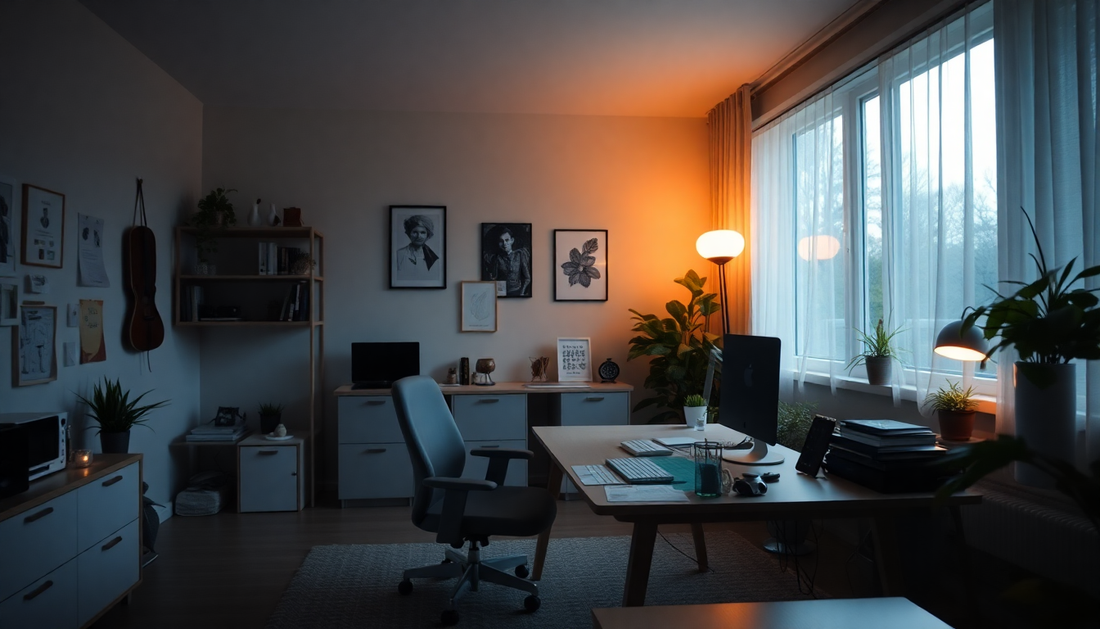
Introduction: A Practical Playbook for the Modern Home Office
The home office revolution brought flexibility, family time, and fewer commutes — but also a quiet epidemic of prolonged sitting, decision fatigue, and misaligned circadian cues. This playbook shows how to map your energy using wearables, circadian lighting, and sensor zones so micro‑movement breaks become effortless rather than another item on your to‑do list. It combines physiology, habit design, practical tech integrations, and daily routines into a repeatable system you can tune to your life.
Why Movement, Energy Mapping and Circadian Alignment Matter
Sedentary behavior harms metabolic health, mood, and cognitive performance. Micro‑movements — short, frequent bouts of motion — counteract these harms by improving circulation, resetting posture, and clearing mental fog. Energy mapping turns subjective fatigue into objective patterns by combining biometric and environmental data. When you know your personal energy curve, you can place high‑value tasks and movement prompts at the best times.
The Science in Brief
- Heart rate variability (HRV) reflects autonomic balance; drops often correlate with stress or fatigue.
- Circadian rhythms are entrained by light exposure, activity, and social cues; daytime bright light increases alertness, evening warm light supports sleep onset.
- Frequent short breaks improve glucose metabolism and attention more consistently than a single long break.
What Is an Energy Map?
An energy map is a time‑based profile of your physiological state and environment over days or weeks. Inputs typically include heart rate and HRV, step and sedentary data, light exposure, and room occupancy. The output is actionable: specific break types, timing, and environmental changes designed to optimize performance, rest, and sleep.
Core Components of the Home Office Movement System
- Wearables: wrist watches, rings, or chest straps that log heart rate, HRV, steps, and sleep.
- Circadian lighting: tunable LEDs and fixtures that adjust spectrum and intensity by schedule or trigger.
- Sensor zones: motion, presence, or pressure sensors that detect location and posture.
- Automation platform: a local or cloud automation system to connect sensors, wearables, and lights to prompts.
- Movement library: a curated set of micro‑routines mapped to energy states and time available.
Wearables: What to Track, Why It Matters, and How to Use It
Wearables are the engine of personalized energy mapping. They provide continuous physiological context that can be used to trigger precisely timed nudges.
Key Metrics and What They Mean
- Resting heart rate: baseline cardiovascular load; higher trends can indicate stress or illness.
- Heart rate variability (HRV): short‑term variability that indicates recovery status and stress resilience.
- Activity and step cadence: identifies when and how intensely you move during the day.
- Sedentary time and posture detection: highlights long uninterrupted sitting windows.
- Sleep onset, duration, and efficiency: anchors for circadian interventions.
How to Capture High‑Quality Data
- Wear consistently: aim for continuous daytime wear and night use for sleep metrics.
- Enable high‑resolution sampling if your device supports it; this improves HRV fidelity.
- Export raw or summary data weekly to a spreadsheet or dashboard for pattern analysis.
- Establish a baseline week with no behavioral changes to discover natural rhythms.
Data Interpretation: Practical Rules of Thumb
- Repeated HRV drops at consistent times often indicate predictable workload stressors or nutritional timing issues.
- Long sedentary windows (30–90+ minutes) are the most actionable target for immediate change.
- Late light exposure and low daytime bright light usually correlate with delayed sleep onset and afternoon energy shifts.
Circadian Lighting: Principles and Practical Setup
Circadian lighting systems mimic the natural progression of daylight by changing intensity and spectrum. Properly timed light can elevate daytime alertness and support an earlier, deeper sleep onset at night.
Simple Light Recipes for the Home Office
- Morning ramp (wake to mid‑morning): bright, cool light (higher blue content) for 45–90 minutes after waking to boost morning alertness.
- Midday sustain: full spectrum, moderate intensity to support focus without overstimulation.
- Late afternoon taper: reduce intensity and blue light 2–3 hours before planned bedtime to encourage melatonin drive.
- Evening relaxation: warm, dim light for reading and winding down; avoid screens or use blue‑light filters if needed.
Hardware and Placement Tips
- Use tunable overhead fixtures for room‑level control and smart bulbs for desk lamps to allow layered control.
- Place brighter light sources in peripheral vision rather than directly into the eyes to avoid glare while still providing circadian stimulation.
- Consider a wearable light alarm or light therapy lamp if you struggle with morning light exposure, especially in winter months.
Lighting as a Behavioral Cue
- Brighten lights slightly to cue short cardio micro‑breaks during predictable slumps.
- Dim or warm lights as a contextual cue for restorative, low‑intensity movement and evening wind‑down.
- Combine lighting changes with sound or haptic cues for redundant signaling that increases adherence.
Sensor Zones: Design, Placement and Use Cases
Sensor zones convert your physical space into context‑aware triggers. They reduce friction by automating prompts only when relevant.
Common Sensor Types and Where to Put Them
- Desk presence sensors: under‑desk pressure pads or chair sensors to detect prolonged sitting and poor posture.
- Motion sensors: doorway, hallway, and kitchen motion sensors that detect breaks and transitions.
- Wearable proximity or Bluetooth beacons: detect when a person is near a zone like the exercise corner.
- Environmental sensors: light meters and temperature sensors that refine circadian and comfort routines.
Sensor Zone Use Cases and Automations
- If chair sensor shows 45 minutes continuous sitting, trigger a posture reset and haptic reminder on the wearable.
- If hallway motion detected after a break, start a 3‑minute guided mobility video on the laptop to reinforce walking breaks.
- If the kitchen motion sensor detects presence without sustained activity, prompt hydration and a short calf‑raise sequence.
Automation Platforms: How to Connect the Pieces
Automation platforms bridge wearables, lights, and sensors. Choose a platform that fits your comfort with local vs cloud control and supports the devices you own.
Popular Integration Approaches (Examples)
- Local-first hub (Home Assistant, Node‑RED): best for privacy and complex conditional logic; can accept BLE or API data from wearables and trigger local lighting and sensor actions.
- Smart home ecosystems (Apple HomeKit, Google Home, Samsung SmartThings): easy to use; good for off‑the‑shelf bulbs and sensors with native integrations.
- Cloud automation (IFTTT, Zapier): simple cross‑service workflows; good for notifications and basic triggers if devices expose webhooks or APIs.
- Mobile shortcuts: use native Shortcuts or routines for personal automations when you prefer phone‑centric prompts tied to apps and wearable notifications.
Sample Automation Logic (Pseudocode)
No code needed here — this pseudocode describes common automations you can implement in most platforms.
- When wearable.HRV drops below baselineThreshold AND currentHour between 10 and 16 -> trigger lightScene('brightPulse'), send hapticNotification('2‑minute brisk walk'), showVideo('mobility3min').
- When deskSensor.sedentaryMinutes > 45 -> trigger soundCue('postureReset'), flashDeskLight(warmColor, 1 second), logEvent('posturePrompt').
- At scheduledTime 17:45 -> setLightingScene('eveningWarm'), sendPrompt('10‑minute restorative stretch'), setDoNotDisturb(true).
Designing Micro‑Movement Breaks: A Library You Can Use
Micro‑breaks should be brief, easy, and effective. Below is a categorized library with descriptions you can memorize or assign to automation events.
Postural Resets (30–90 seconds)
- Scapular squeeze: sit or stand, pinch shoulder blades together 10 times for 1–2 seconds each.
- Pelvic tilt: standing or lying, tuck and untuck the pelvis slowly for 30–60 seconds to reset lumbar posture.
- Chin tucks: 8–12 repetitions to combat forward head posture.
Mobility Sequences (2–5 minutes)
- Spine flow: slow cat–cow movements with standing hip circles at the end.
- Hip opener flow: standing lunges with torso reaches to open hips and thoracic spine.
- Shoulder capsule mobility: wall slides or band pull‑aparts to reduce shoulder stiffness.
Cardio Bursts (1–3 minutes)
- March in place with high knees for 60–90 seconds to raise heart rate and circulation.
- Step‑ups: alternate legs on a stair or step stool for 60–90 seconds.
- Tabata desk punches: 20 seconds on/10 seconds off for 4 rounds of brisk punches or shadow boxing.
Eye & Cognitive Resets (60–120 seconds)
- 20‑20‑20: every 20 minutes look 20 feet away for 20 seconds; pair with deep breathing.
- Alternate nostril breathing or 4‑4‑8 box breathing to reduce sympathetic arousal.
How to Match Break Type to Energy State
- High cognitive demand, low energy: choose short, light cardio bursts to increase arousal without a long recovery period.
- High stress / low HRV: choose breathing and mobility to reduce sympathetic load and restore focus.
- Late afternoon low energy but good arousal: choose outdoor light exposure and brisk walking for circadian and metabolic benefits.
Sample Day Plans for Different Roles
Customize these templates to your schedule and documented energy map.
Knowledge Worker (9am–5pm)
- 8:00–8:30 — wake, 10 minutes bright light, hydration, 5‑minute mobility
- 9:15 — desk posture cue, 60 seconds
- 10:45 — HRV dip trigger, 3‑minute brisk step‑up sequence
- 12:30 — 20‑minute outdoor walk for digestion and light exposure
- 14:30 — desk + light cue, 2‑minute mobility (hip + thoracic)
- 16:00 — standing tempo work for 15 minutes, drink water
- 18:30 — dim lights, 10 minutes restorative stretching
Developer / Deep‑Work Focus Blocks
- Block 1 (60–90 minutes) — intense focus; end with 60–90 second postural reset
- Break (5 minutes) — short walk outside or stair climb; bright light if available
- Block 2 — repeat; longer midday break for lunch and 20‑minute walk
Putting It Together: A 30‑Day Implementation Plan
This phased approach helps you build data collection, automation, and habit adherence incrementally.
Week 0 — Baseline & Planning
- Wear your device daily, enable sleep tracking, and record current lighting and movement habits without change.
- Install one sensor (desk or doorway) and choose an automation platform.
- Set a simple daily goal: one posture reset prompt at 10:00am.
Weeks 1–2 — Add Prompts and Light Scenes
- Analyze baseline data and identify two daily slump windows to target.
- Create two automation rules: one HRV or time‑based midday break and one sedentary prompt.
- Set circadian light scenes for morning and evening.
Weeks 3–4 — Iterate and Expand
- Review adherence and HRV/step trends; refine thresholds to reduce false positives.
- Add an exercise corner and a beacon to reinforce purposeful breaks.
- Introduce a weekly review ritual to check metrics and plan the coming week.
Advanced Integrations and Examples
For power users who like custom dashboards and nuanced conditions, consider these options.
Home Assistant Flow Example
- Use the Bluetooth or API integration to fetch wearable HR and HRV data.
- Create a template sensor to calculate rolling HRV averages and detect dips relative to the 7‑day baseline.
- Trigger lighting scenes and send local notifications when conditions match a slump pattern.
Node‑RED Example
- Pull wearable metrics via webhook or API node; use function nodes to apply smoothing and thresholds.
- Emit MQTT messages to lights and sensors to decouple logic and device control.
- Log events to a time series database to visualize adherence and trends.
Metrics and Dashboards: What to Watch
- Weekly average sedentary bout length and number of breaks per day.
- HRV trend and frequency of low‑HRV events during work hours.
- Sleep onset time and sleep efficiency to monitor circadian improvements.
- Adherence rate to prompted breaks and subjective mood/stress journaling entries.
Case Studies: Real‑World Implementations
Case Study 1 — Maria the Designer (Expanded)
Maria tracked baseline for seven days and found a consistent 2pm slump associated with long back‑to‑back meetings and dim late afternoon office light. She installed a hallway motion sensor and a smart bulb on the desk. Her automation: when wearable HRV dipped 12% below baseline OR when the chair sensor showed 60 minutes sitting, the desk lamp brightened for 60 seconds and her watch vibrated. The watch prompt was branded with her favorite song snippet. Over four weeks she increased daily movement breaks from 3 to 8, reported fewer headaches, and improved sleep timing.
Case Study 2 — Jamal the Developer
Jamal needed long uninterrupted deep work blocks but also wanted to avoid back pain. He used an hourly locked timer for deep work and created a micro‑movement cue that only appears between deep blocks: 45 seconds of mobility and a standing stretch. He layered his automation so that if his HRV dropped during deep work, his system delayed the next deep work block slightly and inserted a 90‑second reset. This preserved deep flow while protecting recovery.
Case Study 3 — Family Home Office Coordination
A household with two remote workers and young children set shared hallway lighting scenes and family sensor zones. Each adult had personalized wearable thresholds, but hallway motion triggered a family walk reminder at midday that turned into a shared ritual. The shared routine improved adherence and created social reinforcement for movement.
Privacy, Data Ownership and Security — Practical Guidance
- Prefer local automations and hubs if you want data to stay in your home network.
- Read vendor privacy policies: choose devices that allow data export and clear deletion if you leave the service.
- Minimize sharing: only export aggregate reports for coaches or employers, not raw time‑series unless required.
- Use strong local network security: keep hubs on a segmented network where possible and use unique device passwords.
Troubleshooting Common Problems
- Too many false prompts: increase thresholds, add hysteresis (require condition to persist for a short window), or add manual snooze options.
- Low adherence: reduce prompt frequency, shorten break duration, and add a pleasurable reward (music, small treat).
- No improvement in sleep: review evening light, reduce late caffeine, and ensure last bright light exposure is at least 2–3 hours before bedtime.
- Wearable battery dead: set a charging window that aligns with a non‑critical time such as lunch or shower to preserve continuous data.
Accessibility, Inclusion and Flexibility
- Offer alternatives: seated mobility or breathing sequences for people with mobility limitations.
- Use multimodal cues (haptics, sound, subtle light change) to support different sensory needs.
- Allow personalization: everyone has different thresholds, pain histories, and schedules — systems must be adjustable.
Budget Builds: Low‑Cost Options
- Wearable alternatives: inexpensive step or heart rate devices and using phone sensors can work when high‑fidelity HRV is not required.
- Lighting: smart bulbs in a desk lamp are a cheap way to gain circadian control without rewiring ceilings.
- Sensors: simple motion sensors and a free mobile automation app can deliver most of the behavior cues at low cost.
Motivation and Habit Design: Psychology Tips
- Start with tiny habits: if a break feels like too much, reduce it to a 30‑second movement and build from there.
- Stack habits: attach a micro‑movement to an existing cue like finishing a meeting or refilling a water bottle.
- Reinforce with immediate rewards: a favorite tune, a green check in an app, or a short journal entry noting that you feel better.
- Track streaks and celebrate small wins weekly rather than daily to reduce the pressure of perfectionism.
Longer Term: From Micro‑Breaks to Better Health
Micro‑movement systems not only reduce daytime fatigue and pain but can lead to lasting changes in sleep timing, metabolic markers, and mood. The compounding effect of consistent short breaks, better sleep, and aligned activity can be substantial over months and years.
Additional Resources and Further Reading
- Evidence summaries on HRV and workload management in publicly available scientific literature.
- Guides on circadian lighting principles from sleep and chronobiology experts.
- Open source automation communities and forums for device‑level integrations and templates.
Conclusion: Start Small, Automate, Iterate
The Home Office Movement Playbook is a system, not a single product. Start by collecting data, add one sensor and one light scene, then implement a single, pleasurable micro‑break. Automate redundant cues so you don't have to remember everything. Over 30 days you can build a reliable, low‑friction movement loop tailored to your energy. In 2025 the tools are mature enough to make movement invisible; the remaining work is habit design and gentle iteration.
30‑Day Quick Checklist
- Day 0: Pick your wearable and ensure sleep tracking is enabled.
- Days 1–7: Baseline data collection, install one desk sensor, keep a simple mood log.
- Days 8–14: Implement two automation rules (one sedentary prompt and one HRV‑based prompt) and a morning light scene.
- Days 15–21: Add an exercise corner or beacon and a mid‑day outdoor walk cue.
- Days 22–30: Review metrics, refine thresholds, and celebrate progress with a small reward.
Ready to map your energy and make micro‑movement breaks effortless? Start with a single sensor and one prompt today — small nudges lead to big improvements.