
Home Office Motion Design: How Wearables, Smart Sensor Zones & Circadian Lighting Normalize Daily Micro-Movements for Remote Workers
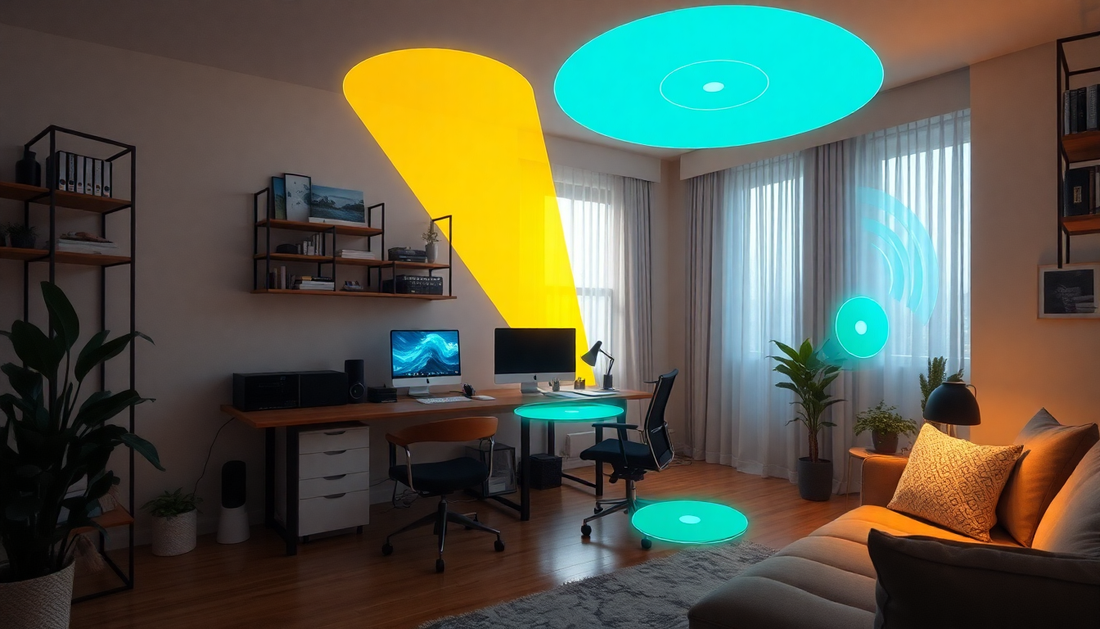
Introduction: The New Frontier of Motion-Aware Home Offices
Remote work is now mainstream, but the home office often lacks the incidental motion built into commutes, office walks, and casual conversations. This absence adds up: more sedentary time, stiffer bodies, lower energy, and worse long-term health outcomes. Home office motion design solves this by integrating wearables, smart sensor zones, and circadian lighting to normalize frequent, brief actions—micro-movements—throughout the workday.
This long-form guide explains why micro-movements matter, how the three technology pillars work together, practical implementation steps for individuals and teams, privacy and cost considerations, and measurable outcomes you can expect. Whether you are a solo remote worker looking to feel better by the end of the day or a people leader building a wellbeing program for distributed teams, this post gives a complete playbook.
TL;DR: What You Need to Know
- Micro-movements are short bursts of movement (30 seconds to 2 minutes) that interrupt sedentary stretches and deliver outsized benefits for pain, metabolism, cognition, and mood.
- Wearables provide personalized sensing and nudges; smart sensor zones trigger contextual prompts in the environment; circadian lighting aligns movement timing with biology and subtly cues behavior.
- Design for low friction: small doses, privacy-first sensing, and adaptive nudging to reduce notification fatigue.
- Begin with a 30-day pilot: baseline measurement, light instrumentation, nudges, and a monthly review of behavioral and wellbeing metrics.
Core Concepts: Micro-Movements and Motion Design Principles
Define micro-movements: short, purposeful body shifts that are easy to repeat and can be performed without changing clothes or taking long breaks. Examples include standing and stretching for 60 seconds, a brief walk to the kitchen, a sequence of shoulder rolls, or a handful of calf raises near the desk.
Motion design principles for the home office:
- Make movement effortless: reduce setup and social friction so the worker can act quickly.
- Make nudges contextual: time suggestions to natural break points (end of a meeting, calendar gap, task completion).
- Personalize intensity and timing: different ages, fitness levels, and chronotypes need different cues.
- Protect privacy and autonomy: sensing should be minimally invasive and user-controlled.
- Close the feedback loop: show simple outcomes (minutes moved, streaks, symptom reductions) to reinforce behavior.
Why Micro-Movements Deliver Big Benefits
- Physiological resets: brief movement improves blood flow, lowers insulin spikes after meals, and prevents stiffness.
- Cognitive micro-boosts: short bouts of movement increase arousal and attention via neuromodulators, helping with focus and creativity.
- Pain prevention: frequent posture changes reduce cumulative load on the spine and shoulders.
- Habit formation: repeated small actions are easier to sustain than long, infrequent workouts.
For SEO: these benefits tie directly to search queries around ergonomics, productivity hacks, circadian health, and wearable tech for remote workers.
The Three Pillars Explained
1. Wearables: Personal Sensing and Gentle Coaching
Modern wearables capture high-resolution movement, heart rate variability, skin temperature, and sometimes electrodermal activity. In motion design, wearables are the personal layer that senses when the body needs a micro-break and delivers a haptic, visual, or audio nudge.
- Sensing capabilities useful for motion design: step/motion detection, posture inference, sit/stand timers, heart rate variability (HRV), and proximity to desk gear via BLE.
- Nudging strategies: silent vibration for private nudges, soft chimes timed to calendar gaps, or a short message with a recommended 60–90 second routine.
- Personalization levers: activity thresholds (e.g., nudge after 45 minutes sedentary), adaptive intensity based on prior responsiveness, and goal-based coaching for chronic pain or metabolic targets.
Implementation tips:
- Choose wearables with open APIs or healthy integration ecosystems so data can pair with other home office systems.
- Enable edge processing where possible so sensitive data stays on-device.
- Start with gentle nudges and allow the user to increase or decrease frequency to avoid annoyance.
2. Smart Sensor Zones: Contextualizing Movement in the Physical Space
Smart sensor zones break the environment into meaningful areas such as the desk, standing station, entry/exit, and kitchen. Non-camera sensors (pressure mats, passive infrared, load cells, BLE beacons, door sensors) detect transitions and posture cues that wearables may miss.
- Actions enabled by sensor zones: automated lighting cues, ambient audio prompts, task-linked actions (e.g., brew a tea at a scheduled break), and analytics on movement distribution across the day.
- Privacy-forward choices: avoid cameras where possible; prefer presence/pressure sensors and local processing.
Design checklist:
- Map your space into 3–5 zones for starters.
- Use non-visual sensors for sensitive areas and keep data aggregated.
- Co-design prompts so they feel natural: for example, brighten hallway lights slightly when a break is suggested.
3. Circadian Lighting: Timing Movement With Biology
Circadian lighting changes color temperature and intensity through the day to align with circadian rhythms and can nudge behavior subtly. Lighting acts as both a physiological regulator and an environmental cue.
- Morning: brighter, cooler light to promote alertness and encourage moderate activity.
- Midday: maintain balanced light to support steady focus and occasional mobility.
- Late afternoon/evening: warmer, dimmer light to cue restorative breaks and signal winding down.
Harmonizing lighting with wearables and sensor zones creates gentle choreography that makes movement feel like part of the workflow rather than an interruption.
Integration: How the System Orchestrates Micro-Movements
A well-integrated motion design system follows a simple flow:
- Sensing: wearables and sensors detect prolonged sedentary time or posture strain.
- Decisioning: an on-device or cloud algorithm evaluates the context (calendar, time of day, prior responsiveness).
- Actuation: a haptic nudge, a lighting cue, or a contextual prompt appears, recommending a short routine.
- Feedback: the system records completion and updates the model to improve future nudges.
Key considerations for integration:
- Prefer local inference for immediate nudges and privacy.
- Allow manual overrides so users can opt out during deep-focus work.
- Log only high-level aggregated success metrics when sharing with employers or teams to protect individual privacy.
Designing Micro-Movement Routines
Good micro-movements are short, scalable, and adaptable. Examples and their targeted benefits:
- Desk mobility (60 seconds): seated cat-cow, shoulder rolls, wrist flexes. Targets upper back and neck tension relief.
- Stand-and-shift (90 seconds): stand, heel raises, hip circles, side bends. Targets lower back and hip mobility.
- Walk-and-refill (2 minutes): brisk walk to kitchen, refill water, brief calf stretch. Targets circulation and hydration routines.
- Reset sequence (3–5 minutes): wall push-ups, mini squat series, breathing. Targets full-body reset and mental reset.
Sequence design tips:
- Keep routines context-aware: a 30-second routine is appropriate during meetings; a longer 3-minute reset can be suggested at midday.
- Offer options: show 2–3 routines based on available space and preferences.
- Include progressive difficulty for those who want to use micro-movements as part of a fitness routine.
Implementation Roadmap: 90-Day Home Office Motion Design Plan
Phase 1 — Audit and Baseline (Days 1–14)
- Self-audit or team survey: record typical sedentary stretches, pain points, and sleep/wake timing for one week.
- Choose a wearable and one smart sensor zone to pilot.
- Set baseline metrics: total sedentary minutes, longest uninterrupted sitting, perceived focus, pain ratings.
Phase 2 — Pilot and Tuning (Days 15–45)
- Deploy nudges: start with gentle wearable vibrations and subtle lighting cues tied to a 45–60 minute threshold.
- Collect response data and survey feedback weekly.
- Tune frequency, timing, and message tone to reduce drop-off.
Phase 3 — Scale and Embed (Days 46–90)
- Add additional sensor zones and integrate calendar cues for context-aware prompts.
- Run a 30-day challenge for habit reinforcement with simple rewards or leaderboards (privacy-preserving and opt-in).
- Review outcomes and calculate ROI based on reduced discomfort, improved focus, and behavioral adherence.
Measurement Framework and KPIs
Combine objective and subjective measures:
- Objective activity metrics: total micro-movement events per day, longest sedentary bout, standing minutes, steps.
- Physiological proxies: resting heart rate trends, HRV changes, sleep duration and quality.
- Subjective indicators: self-reported focus, energy, musculoskeletal discomfort ratings, and overall satisfaction.
- Business-level metrics (for teams): reported sick days, employee engagement scores, self-reported productivity.
Baseline data for 2–4 weeks and then measure changes in monthly cohorts to demonstrate trends and ROI.
Cost Considerations and Budgeting
Estimate elements and price bands (2025 market estimates):
- Wearable device: low-cost trackers to advanced smartwatches. Budget range: modest to premium.
- Sensor zones: simple pressure mats or door sensors are low-cost; smart home sensor kits and load cells are mid-range.
- Circadian lighting: smart bulbs are affordable; dedicated fixtures or tunable panels are higher cost.
- Software and integration: free DIY integrations to paid platforms with interoperability and analytics.
Budgeting tips:
- Start lean: one wearable and one sensor zone to prove value.
- Prioritize software and integration; good software can orchestrate inexpensive hardware effectively.
- Consider a phased budget tied to measurable outcomes.
Privacy, Security and Ethical Guidelines
To build trust and avoid misuse:
- Favor on-device processing and aggregate signals for reporting.
- Provide transparent consent, clear data retention policies, and easy opt-out mechanisms.
- Restrict employer access to aggregated, anonymized team-level metrics, not individual raw data.
- Use encryption for data at rest and in transit, and strong authentication for cloud services.
- Avoid visual monitoring (cameras) unless explicitly consented to and legally justified.
Case Study 1 — Solo Remote Designer (Anonymized Pilot)
Background: A freelance UX designer spent about 10 hours per day seated and reported neck and lower-back stiffness by afternoon. They piloted a motion design setup with a wrist wearable, a pressure mat at the chair, and two circadian bulbs.
Intervention:
- Wearable nudges at 45 minutes of continuous sitting.
- Pressure mat tracked seat-off events and triggered a hallway light pulse when a break was suggested.
- Circadian lighting brightened in the morning and shifted warmer later in the day.
Outcomes after 8 weeks:
- Continuous sitting time dropped by 40%.
- Self-reported afternoon stiffness decreased by 60%.
- Perceived focus during deep work increased; the user reported fewer long, distracting breaks.
Key learnings: align nudges to creative cadence, give simple movement options, and allow quiet focus mode to prevent interruptions during high-concentration tasks.
Case Study 2 — Distributed Design Team Pilot
Background: A 25-person distributed product team implemented a motion design pilot to combat afternoon energy slumps and musculoskeletal complaints.
Intervention:
- Company subsidized wearables and offered a sensor kit for home office zones.
- Integration platform aggregated anonymized data to track team-level trends and efficacy.
- Teams ran a 4-week opt-in micro-movement challenge with weekly tips and brief group stretch sessions.
Outcomes after 12 weeks:
- Average continuous sitting time dropped 38% across participants.
- Self-reported afternoon focus increased 22% and late-day fog decreased markedly.
- Reported musculoskeletal complaints decreased by 30% and engagement scores improved.
Key learnings: voluntary programs that emphasize autonomy and privacy achieved higher buy-in than mandatory monitoring. Visible short-term wins (less pain, clearer afternoons) drove sustained adoption.
Integration Architecture: Example Stack
High-level components for an integrated motion-aware home office:
- Edge layer: wearable device, zone sensors with local gateway for immediate processing.
- Home orchestrator: local hub or smartphone app that coordinates nudges, lighting, and short routines.
- Cloud analytics (optional): aggregates anonymized metrics for long-term trends, team dashboards, and ML models to improve nudging logic.
- Privacy and security: on-device encryption, secure pairing, and role-based access controls for any shared dashboards.
Design tip: build the minimum viable orchestration locally first. Cloud features can be added when privacy, scale, and analytics needs justify it.
Script and Message Examples for Nudges
- Gentle vibration + short message: 'Micro-move? 60 seconds: stand, roll shoulders, breathe.'
- Lighting nudge: subtle warm pulse in hallway + chime at end of an hour to cue a refill walk.
- Calendar-aware nudge: 'Next meeting in 6 minutes — quick 90-second reset before joining?'
- Encouraging follow-up: 'Nice job! 2 micro-movements so far today. Your back thanks you.'
Tone guidance: keep prompts positive, concise, and optional. Offer quick dismiss options and quiet hours.
Common Pitfalls and How to Avoid Them
- Over-notification: use adaptive schedules and allow the user to set 'do not disturb' windows.
- Poor mapping to tasks: ensure nudges respect meeting times and deep work periods; calendar integration helps.
- One-size-fits-all routines: let users select from multiple micro-movement templates and intensities.
- Privacy missteps: be transparent about data use and avoid sensitive sensing modalities unless consented.
- Lack of feedback: show simple progress indicators to reinforce the habit loop.
FAQ: Practical Questions Remote Workers Ask
How often should I nudge myself to move?
Start with a comfortable cadence: 45–60 minutes of sitting followed by a 60–90 second micro-movement. Adjust down if you have musculoskeletal risk or up if you need fewer interruptions.
Will micro-movements replace exercise?
No. Micro-movements are complementary. They reduce the harm of prolonged sitting and improve daily recovery, but dedicated moderate-to-vigorous exercise remains important for cardiovascular fitness and strength.
Can this system work without buying new hardware?
Yes. Many smartphones can provide basic nudges, and simple routines can be done without sensors. Wearables and sensors add personalization and automation but aren't strictly required to start.
Are there accessibility considerations?
Absolutely. Offer movement alternatives for people with limited mobility, allow customization of routines, and provide audio or visual options depending on user needs.
SEO and Content Strategy Tips for Publishers
If you are publishing content on this topic, optimize for queries around 'home office ergonomics', 'micro-movements', 'wearable nudges', 'circadian lighting for home', and 'remote worker wellbeing'. Include:
- Long-form content with clear headings and actionable tips (this article is an example).
- How-to guides, checklists, and downloadable templates for pilots.
- Real-world case studies or anonymized pilot results to show practical impact.
- FAQ sections for voice search and featured snippet opportunities.
Templates and Resources You Can Use Today
Quick starter templates:
- 30-day micro-movement challenge calendar — schedule one 60-second micro-move every hour.
- Privacy checklist for home office sensors — list of consents, retention windows, and local-processing options.
- Wearable nudge tone guide — suggested messages and timing for different work rhythms.
Actionable first step: track your current sitting patterns for one week using a simple habit tracker or phone app, then choose one micro-movement and one cue to start with for 30 days.
Future Directions: What to Watch in 2025 and Beyond
- Smarter, privacy-first AI: local models that learn user preferences quickly without moving raw data to the cloud.
- Furniture-as-actuator: desks and chairs that gently reposition to encourage posture shifts.
- Interoperability standards: common protocols so wearables, lights, and sensors interoperate securely across vendors.
- Biofeedback-informed nudges: combining HRV and movement to suggest the most restorative micro-movements for stress reduction.
Conclusion: Design Movement Into the Workday
Home office motion design is a practical strategy to make remote work healthier and more sustainable. By combining wearables, smart sensor zones, and circadian lighting, you can normalize micro-movements that reduce pain, boost cognition, and improve energy without disrupting workflow. Start small, protect privacy, measure outcomes, and iterate. The goal is not to add another chore to the day but to architect an environment where moving well is the path of least resistance.
Call to Action
Begin today: pick one micro-movement, set a single nudge (phone timer or wearable), and commit to 30 days. Track your perceived focus and discomfort at the start and end of the month. If you want a template or a 30-day challenge calendar, adapt the sample calendars in this post to your schedule and share results with peers to build momentum.
Further Reading and Suggested Search Queries
Search queries to learn more: 'micro-movements for remote workers', 'circadian lighting benefits', 'wearable nudges for productivity', 'home office sensor privacy best practices'. These queries will lead to evidence reviews, product comparisons, and community pilot reports that can help you refine your motion design approach.